Artensoft Photo Mosaic Wizard Product Description
Creating a photo mosaic couldn't be easier.
- Select the master image (the image you will see from a distance).
- Select a tile (select a folder with one or more images, the more the better).
- Click Create Mosaic to create the mosaic (select settings if necessary)
- Move, resize and swap tiles to complete your digital photomosaic. Skip if not needed.
- Save the mosaic photo file.
The software creates realistic photomosaics by carefully selecting individual tiles and arranging them in matching order to approximate a master image.
We do not use techniques such as color overlays to blend cel images into a master image.
Instead, it solves complex mathematical equations that turn the cell images into stunningly realistic mosaics. 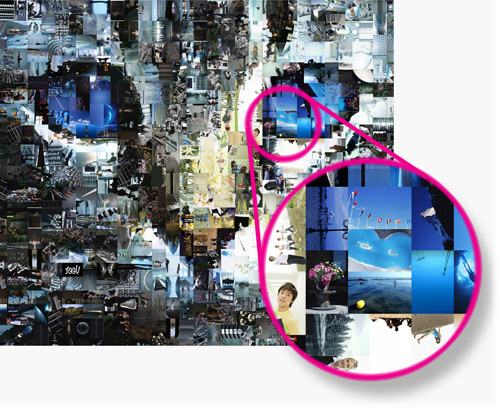
If you're not satisfied with the automatically generated photo mosaic, you can move, resize or swap individual tiles to complete your mosaic photo. 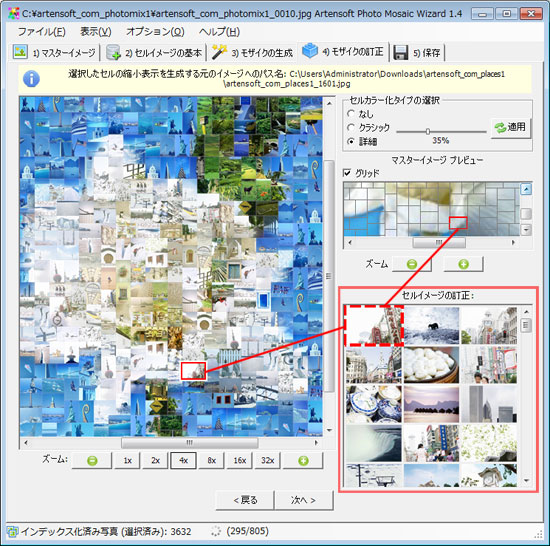
Unleash your creativity with Photo Mosaic Wizard!
The possibilities with this little tool are endless.
From photo wallpapers to poster-sized montages to photo mosaics, Photo Mosaic Wizard will impress family and friends for generations.
This software is completely standalone and does not require any third party software to run.
The tool creates realistic mosaics without the need for a designer or anyone with photo editing skills.
All you need is a Windows PC and a number of photos to create the mosaic.