FAQ - aeroTAP
-
What is the difference between aeroTAP 3D Camera and aeroTAP 3D G2?
The G2 camera has excellent 3D capture accuracy. If you are using it as a 3D camera, we recommend the G2 camera.
- How do I remove the head of the aeroTAP 3D camera?
-
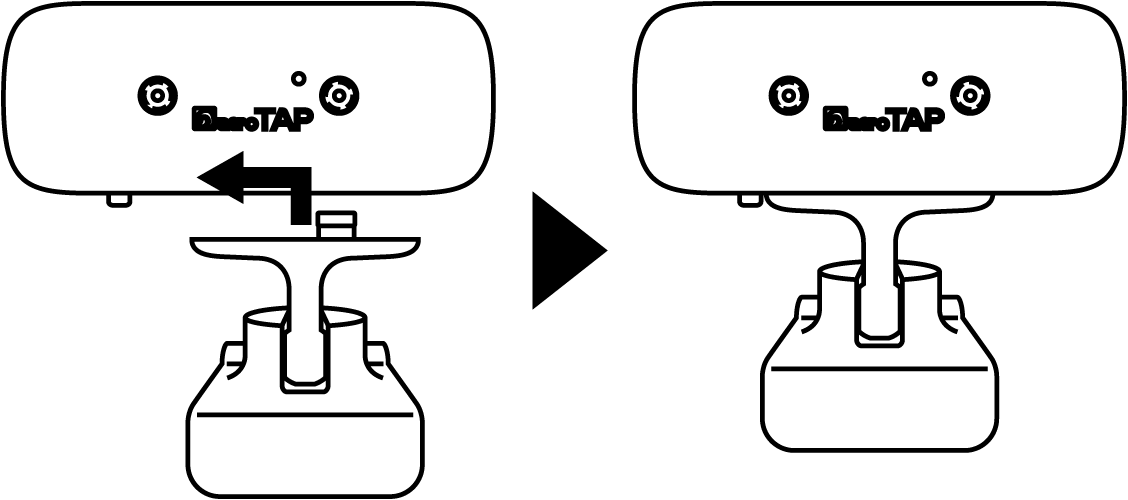
When attaching the camera base to the camera head, first attach the camera base as shown on the left, and then slide the camera base to the left until you hear a click. 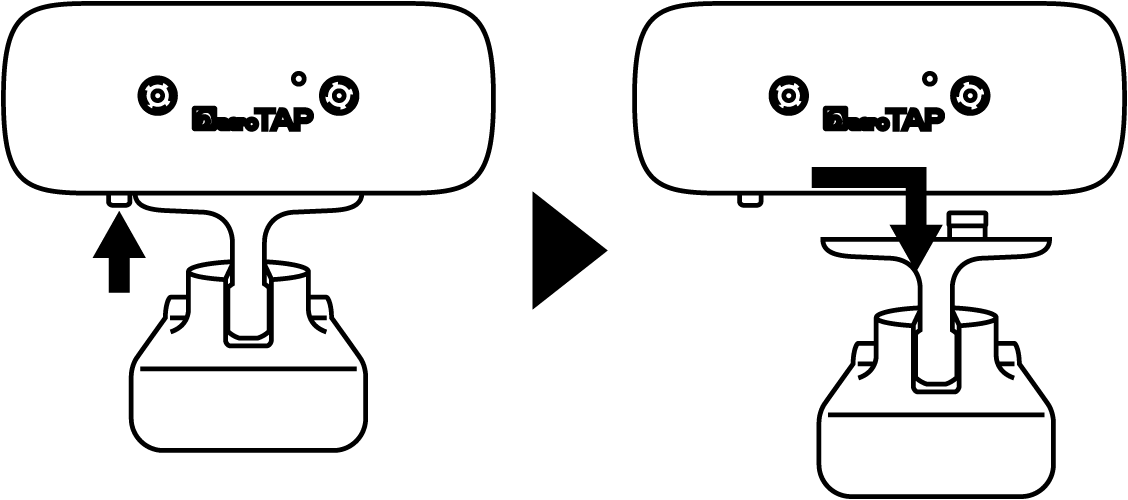
To remove the camera head, press the button on the bottom left of the camera head and then slide the camera base to the right to remove it. - How can I check the serial number of the aeroTAP 3D camera?
You can check the version information by starting aeroTAP evo.
- What is the warranty period for the aeroTAP 3D camera?
The warranty period for the camera is one year from the date of purchase. If the base becomes deformed due to aging, the usage environment, or opening the case, the camera will no longer be able to obtain accurate depth images. For initial defects or breakdowns caused by use in normal environments, we will provide a free replacement within one year of purchase.
- Can you develop applications?
In a Windows environment, you can develop applications using the aeroTAP SDK. In a Linux environment, it works as a UVC compatible camera. Color images and depth images can be obtained from /dev/video0 and /dev/video1, respectively. Please refer to the developer page .
- What is the difference between Type A and Type B?
Cameras with an infrared (IR) cut filter are suitable for taking photos, just like regular web cameras. The colors captured are the same as they appear. If there is no IR cut filter, the colors change slightly like an infrared camera, but it is suitable for use as a sensor because it can collect the spectrum of light. It can also detect infrared rays.
- What makes it different from other 3D cameras?
It is a stereo camera (dual camera) that supports USB 2.0/3.0 and even depth images are processed within the camera, making it easy to use and inexpensive.
- Can multiple cameras be connected at the same time?
Up to 4 units via USB 2.0/3.0 (aeroTAP SDK) Up to 10 devices can be connected simultaneously (however, this depends on the USB bus width).
- What apps can be used without touching the aeroTAP?
Any app that runs on the Windows OS can be made touchless.
However, if you are using an app that controls graphics in full screen using OpenGL, etc., display functions such as virtual buttons will not be enabled. Please use it in a Windows screen.
- Is touchless possible with the browser app?
The standard functions make it possible to go touchless.
You can also add generic virtual buttons to create more interactive content.
You can also add generic virtual buttons to create more interactive content.
- What functions can aeroTAP perform with the aeroTAP3D camera?
Using distance information from the aeroTAP 3D USB camera, various functions become available, such as stable palm recognition with unnecessary background removal, gesture recognition such as moving your hand forward and backward, etc. The operation distance can be more finely adjusted, and CPU consumption is further reduced.
- Is it possible to incorporate the aeroTAP touchless interface?
It can be easily incorporated into any Windows OS environment (including embedded).
No high performance CPU or GPU required. USB2.0/Intel Celeron/ATOM or higher
No high performance CPU or GPU required. USB2.0/Intel Celeron/ATOM or higher
- What is the controllable distance range of aeroTAP?
By default, the palm position can be between 40cm and 170cm from the camera. Depending on the settings, it can be set between 30cm and a maximum of 400cm.
- What is the best distance for operation?
If you want to keep the distance fixed, it's best to have your upper body visible on camera.
For more information, please refer to aeroTAP Technical Information - Appropriate Operation Distance and Setting Method .
For more information, please refer to aeroTAP Technical Information - Appropriate Operation Distance and Setting Method .
- Differences in licenses
When you purchase the aeroTAP 3D USB camera, you can choose between the free version and the Professional version for commercial use. See Licensing differences .
- Can individuals purchase this product?
It can be used for personal use. However, some functions required for business use are not available. For full functionality, the Professional version is required.
- Can I switch to the Professional version?
It will be more expensive, but you can add more licenses later.
- Can I use a commercially available web camera?
Support for generic webcams has ended. Please use aeroTAP 3D camera for best performance.
- How dependent is it on the environment?
Although it depends on the camera's performance, palm detection performance may decrease in environments with high contrast, such as backlight.
A minimum brightness of 80 lux is recommended. In low light environments, please use a camera without an IR cut filter and a weak IR projector.
A minimum brightness of 80 lux is recommended. In low light environments, please use a camera without an IR cut filter and a weak IR projector.
- Can it be used through glass?
This is possible with normal clear, flat glass.
- Can I use it on a Mac or Android?
aeroTAP evo is only compatible with Windows OS.