FAQ - Rohos Logon Key
[Technical Question] What happens if I enter the wrong Rohos PIN more than three times?
If you enter a wrong PIN code more than the specified number of times (the default is three times), the USB key will become unusable.In this case, you can use the USB key again by logging in using the emergency login function and entering your password, then logging in, launching Rohos Login Key, and resetting the PIN code.
[Technical Question] The [Allow login only with USB key] checkbox is not enabled in Rohos Logon Key
If your account does not have administrator privileges, this checkbox will not be enabled.Please log in with administrator privileges.
[Technical Question] Are password changes reflected automatically in an AD environment?
In an environment using AD (Active Directory), the password in the USB Key will automatically be updated when the administrator changes the Active Directory password.Password change will be done if you use the following options on the Rohos Login screen:
- If the 'Change password periodically' policy is enabled
- If the 'Change password on next password change' policy is enabled
[Technical Question] I can't access remotely using the USB-Key.
To use a USB-Key for remote access, you need to install a Rohos Logon key on both the source and destination computers, and set the destination computer's Windows logon model to [Standard Windows Login Dialog] (Rohos Logon Credential Provider for Vista and Win7).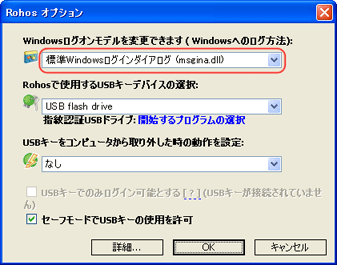
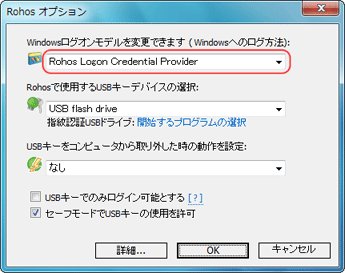
In addition, if you want to remotely access XP from Vista or Win7 using a USB-Key, you will need to install a special module. Please contact us for details on the special module.