


製品番号 20160708-002
AKVIS Sketch Video for Mac
AKVIS Sketch Video for Mac
バージョン 6.0
更新日付 2023/12/04 13:45:53 (Mon)
開発元 AKVIS
AKVIS Sketch Video Classicは、白黒やカラーでビデオ映像を変換するプラグインです。
このプラグインで、簡単に手書き風のような効果を手軽に適用できます!
試用期間は、30日間です。また、動画にウォーターマークが入ります。
スタッフ コメント
自分で録った映像を面白くしたり、変わった感じにしたい方におススメです。
動画を簡単に手書き風にできて、とても使いやすいです。

 Windows版はコチラ
Couldn't load pickup availability
ライセンスに関して Home ライセンスは、個人ユーザーを対象にしたライセンスです。非営利目的でのみ使用可能です。プラングイン版またはスタンドアロン版を選択してください。 Home Deluxeは、プラングイン版+スタンドアロン版です。 Business ライセンスは、ソフトウェアを商用で使用する営利団体を対象にしたライセンスです。 AKVIS 製品購入時に提供されるのは、ライフタイム ライセンスと1年間の無料バージョンアップです。 1つのライセンスにより、2台のコンピュータで利用することができます。
互換OS macOS 10.15.x, macOS 11.x, and macOS 12.x

製品情報
製品情報の詳細1を見る
AKVIS Sketch Video Classicは、白黒やカラーでビデオ映像を変換するプラグインです。
このプラグインで、簡単に漫画のような効果を手軽に適用できます!
AKVIS Sketch Video Classicは、作品や映画に鉛筆画のスタイルを簡単に適用することが可能です。いくつかの簡単な調整をするだけで、ユニークな描画エフェクトが作成されます。
プロジェクトがより興味深いものになります。この製品は、ブログやWebサイトやプロモーションビデオ、映像でのプレゼンテーションを準備するのに役立ちます。
鉛筆画効果で、AEを使用してスライドショーを作成するのに最適です。我が子の“初めて”をアニメチックにしたり、ペットの冒険の様を輝かせたり、旅の忘れられない思い出を残すのに使えます!
プラグインにはプリセットが多数用意されており、効果を完全に制御することができます。また、設定をユーザプリセットとして保存も可能です。
AKVIS Sketch Video Classicは、動画を手書きの画風に変更します。
このプラグインで作業するには、Adobe PremireまたはAfter Effectが必要です。
Step1. プロジェクトを開きます。低コントラストの場合はトーンカーブを使用してください。

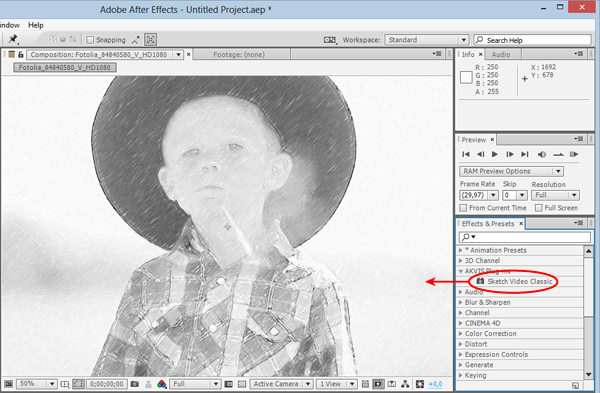
Step2. エフェクトを適用します。
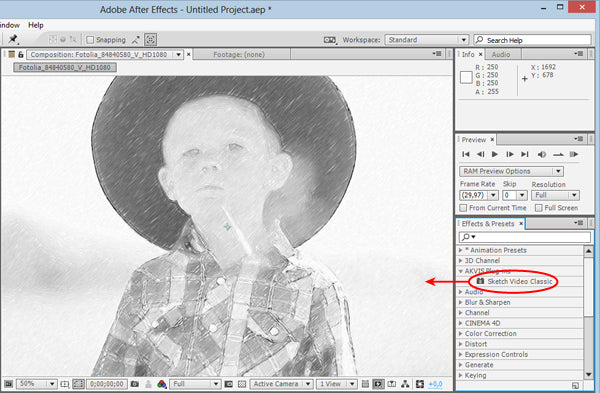
Adobe After Effects:エフェクトとプリセットパネル(または[効果]メニュー)を選択し、AKVISプラグイン → Sketch Video Classicで、ポジションパネルにドラッグします。
Adobe Premiere:エフェクト → ビデオエフェクト → AKVISプラグイン → Sketch Video Classicで、タイムラインにドラッグします。
その結果は、現在のフレームに表示されます。
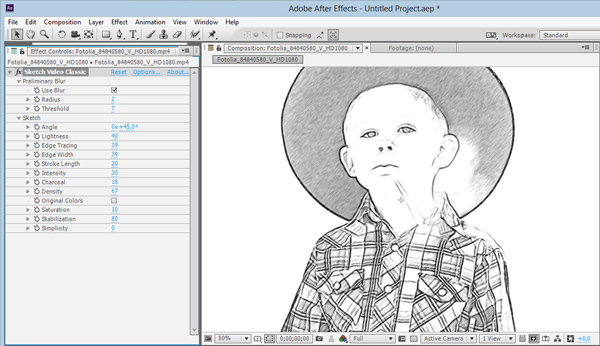
Step3. エフェクトコントロールパネルで、エフェクトの設定を調整します。リセットボタンを押すと元の設定に戻ります。
注:予め用意されているAKVISプリセットを適用することもできます。
Step4. お好みの設定ができたら、プリセットとして保存しておくこともできます。
Step5. 保存します。
Adobe After Effects:構成 → レンダーキューに追加
Adobe Premiere:ファイル → エクスポート →Adobe Media Encoderを起動
製品情報の詳細2を見る
よくある質問
[Regarding license issuance/reissue] Can I install it on multiple PCs?
All AKVIS products, except AliveColors, can be installed on up to two PCs by the same person.It can be installed on two computers, meaning that activation with the same key can only be performed twice.
AliveColors, both the Home and Business versions, can only be installed on one PC.
Program upgrades can be performed by simply overwriting the latest version without activation.
If for any reason you need to reinstall and activate more than once, please contact us with your purchase information.
[TECHNICAL] How to install AKVIS plugin in Photoshop
To install a plug-in in Photoshop, copy the plug-in file into Photoshop's plug-ins folder.Copy the file that ends with .8bf (e.g. Enhancer.8bf) for the 32-bit version, or _64.8bf (e.g. Enhancer_64.8bf) for the 64-bit version.
The locations are as follows.
Photoshop CC 2019:
C:\Program Files\Adobe\Adobe Photoshop CC 2019\Plug-ins\
Photoshop CC 2018:
C:\Program Files\Adobe\Adobe Photoshop CC 2018\Plug-ins\
Photoshop CC 2017:
C:\Program Files\Adobe\Adobe Photoshop CC 2017\Plug-ins\
Photoshop CC 2015.5:
C:\Program Files\Common Files\Adobe\Plug-Ins\CC\
Photoshop CC 2015:
C:\Program Files\Adobe\Adobe Photoshop CC 2015\Plug-ins\
Photoshop CC 2014:
C:\Program Files\Adobe\Adobe Photoshop CC 2014\Plug-ins\
Photoshop CS6:
C:\Program Files\Adobe\Adobe Photoshop CS6 (64 Bit)\Plug-ins\
[Technical Question] Installing Plugins in Corel Paint Shop Pro
If the installation of Corel Paint Shop Pro or other programs fails, you can install them manually using the following method.During installation uncheck the programs and install AKVIS products in the default folder.
(The default is the Program Files folder.)
Copy the *.8bf file (for example, for AKVIS Sketch it is called "Sketch.8bf" in the C:\Program Files\AKVIS\Sketch folder) to the Paint Shop Pro plugins folder.
[Technical Question] What is a Plugin?
A plug-in is a program that adds new features to existing software or enhances its functionality.AKVIS has developed a variety of plugins compatible with popular image editing software such as Adobe Photoshop.
For example, if you use AKVIS products as Adobe Photoshop plug-ins, you can edit any image area in AKVIS products and then bring it back to Adobe Photoshop.
AKVIS plugins are compatible with Adobe products as well as popular image editing software. Check compatibility with the trial version.
If you purchase the plug-in version, it cannot be used as a standalone application.
[Technical Question] Plug-in won't install in Photoshop
Japanese AKVIS products cannot automatically detect the Photoshop Plug-ins folder during installation.In a 32-bit environment it is located in [Program Files], in a 64-bit environment it is located in [program files (x86)] and under it there are folders for each product.
There is a .8bf file in that folder, so please copy it manually and place it in the Photoshop [Plug-ins] folder.
***.8bf is the 32-bit version and ***_64.8bf is the 64-bit version.
Plugins with different versions will not be displayed, so be sure to copy the one that matches your environment.
How to activate AKVIS products (I purchased it but it expired and I can't use it)
Activation is required to use the product as a retail version.The trial version has a 10-day usage limit, and you will no longer be able to use it after the limit has expired, so be sure to activate it.
Activation is possible even after the expiration date.
1. Launch the product
2. Click the [Activate] button in the window that appears.
3. Enter your name (in Roman letters) and activation key
4. Click the [Activate] button
5. If authentication is successful, the product will be installed.
*If you purchased from Sourcenext, two types of keys will be issued. Please enter the 12-digit serial number. The 21-digit serial number is used on Sourcenext and is not the activation key for AKVIS products.
[Operation method] How to change the display language to Japanese
1. Click the gear icon in the top right corner of the window. 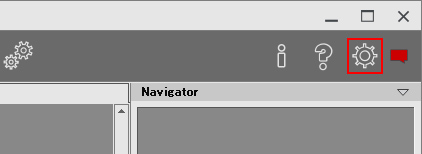
2. Click the [Language] drop-down at the top. 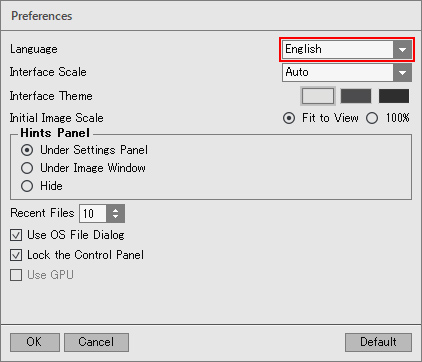
3. Select [Japanese]. 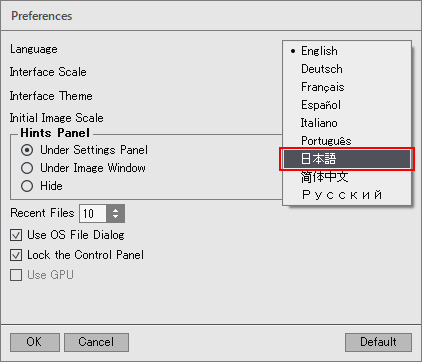
4. Click [OK] to switch the display to Japanese. 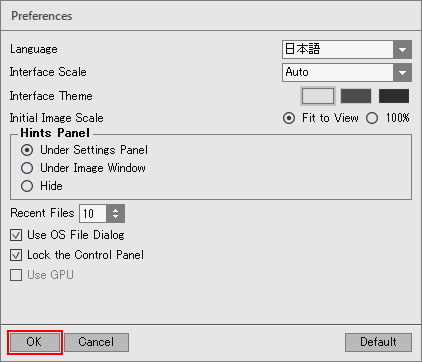
[Other] I entered the serial number but an error occurred and I can't activate it
The serial number (activation key) you enter into your AKVIS product will be a 12-digit number consisting of random alphanumeric characters.If you purchased your product from SourceNext or another company, you may have been issued multiple serial numbers, but in many cases, you may have entered the wrong number, resulting in an error.
Please make sure to enter the license number issued for your AKVIS product.
It is also possible that you have mistakenly entered something that is easily confused, such as an O or a zero.
Whenever possible, we recommend using copy and paste instead of entering information manually.
If you enter your name in Japanese, the characters will be garbled, so please enter it in Roman letters.