Skip to product information
1 of 1

製品番号 20040917-001

Atelier Web Remote Commander Pro

Atelier Web Remote Commander Pro

バージョン 13.3

更新日付 2019/02/12 15:28:24 (Tue)

開発元 AtelierWeb Software

This allows you to control remote computers without having to install any software on them.

You can administer your servers and workstations from your local computer. AWRC does not require you to install any software on the remote machine. This allows you to access remote machines without any preparation. You can do virtually anything on the remote computer with AWRC.

 Please refer to the product information below for differences in functions between the standard version.

[Column] A remote control tool that requires no prior preparation

■Important:
Licenses are managed by the number of PCs on which they are installed. No agent is required on the other side. Therefore, there is no limit on the number of connections.

[Example 1] If you want to manage 50 PCs/servers from one management PC, you will need one license.
[Example 2] If you want to manage 50 PCs/servers from 5 management PCs, you will need 5 licenses.
Regular price ¥13,200
Regular price Sale price ¥13,200
Sale Sold out

license

ライセンスに関して

互換OS Windows 10 64bit and Windows 10 32bit

View full details

購入時の注意
About free upgrades
The free upgrade is valid for one year from purchase or one major upgrade (next version only), after which a new purchase will be required.

製品情報

Atelier Web Remote Commander is a must-have tool for system administrators and helpdesk personnel, especially in environments where remote access is required.

It can run through firewalls.
It allows you to carry out any kind of maintenance operations or perform more detailed audits.
Leaves no trace remotely.
It's safe.

To connect to a remote computer, you need the IP address (or hostname) of the destination computer and account information.
With it, you can connect to a remote computer without any preparation.

*Do not use for malicious purposes such as espionage.

■Product Information

Atelier Web Remote Commander offers many features that other software does not offer.

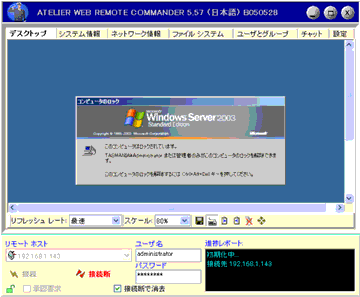
  • You can access the desktop of a remote computer and use the mouse and keyboard to launch software.
  • It allows you to simulate every keystroke on a remote keyboard.
  • You can recover from screensavers with a mouse click or a keystroke, even password-protected screensavers.
  • You can simulate Ctrl+Alt+Del on a remote computer to log on. The default hotkey is Ctr+Alt+D.
  • It provides access to disks, partitions, folders and files. No partition or folder is required to start sharing.
  • Remote files can be downloaded or executed on remote systems. Files can be run as other users (equivalent to RunAs).
  • You can upload a local file to a remote system.
  • You can zip or unzip files remotely.
  • You can create new directories and rename files and directories.
  • You can delete, copy, or move remote files and directories.
  • You can send or receive clipboard content: text, images
    , and other standard Windows clipboard formats
  • Provides partition information, file system name, type, serial number, volume label, capacity and free space.
  • You can see the common areas.
  • You can view the user list, account details, local and global groups.
  • Allows instant loading of password hashes for cross-organizational strong password policy auditing.
  • You can view and manage services: you can start, stop, recover, and unload services.
  • You can see the process. You can stop the process.
  • Remote shutdown, power off and reboot are possible.
  • You can view system information (display of the operating system, processor, BIOS, memory, adapters and logical printers).
  • You can see the detailed hardware device list.
  • Physical Memory Viewer
  • Port discovery. Map of applications utilizing ports.
  • Connecting and listening ports, TCP statistics, UDP statistics, ICMP statistics, Routing information, DNS servers, Strong routes, IP statistics/configuration, Installed protocols/protocol details, Address information table, Network and media tables, Interface statistics/configuration.
  • Provides a chat function for communicating with remote users.
  • Provides anti-aliased scaling for viewing the remote desktop on the local computer.
  • Windows authentication can be used to allow only users with administrative privileges on the individual remote systems to connect (strong passwords are recommended), and strong encryption is available to store information in plain sight.
  • It provides an authentication request feature to obtain remote approval before processing begins.
  • It is firewall transparent.
  • It can run on a company's Microsoft network LAN and over the Internet.
  • No ports need to be open. It is completely transparent to any firewall. Microsoft networking is not blocked by the firewall.

■ Operational requirements

To operate Atelier Web Remote Commander, you need the following:

  • Local and remote systems compatible PC Pentium II/III 600MHz or higher. Pentium/AMD 1000MHz or higher is recommended.
  • 64MB RAM on both the local and remote machines (128MB or more recommended).
  • Local machines are WindowsNT 4.0 SP4+, 2000, XP, 2003 Server, XP Pro x64 64-bit and 2003 Server x64 64-bit, and remote systems are WindowsNT 4.0 SP4+, 2000, XP Pro, 2003 Server, XP Pro x64 64-bit and 2003 x64 64-bit
  • If the remote computer is Windows XP Pro, you can only access it using the classic sharing and security model with local accounts. This can be done in Control Panel / Administrative Tools / Local Security Policy / Network Access: Classic - Local user authentication as yourself. The same can be done in Windows Explorer / Tools / Folder Options / Simple File Sharing.
  • Logging in requires administrator privileges or equivalent on the remote machine. You must provide a username/password that is in the administrators group on the remote machine.
  • Microsoft networks, i.e. Client for Microsoft Networks is installed on the local and remote machines, and file and printer sharing is enabled on at least the remote machine

■ License

Note: To purchase 10 or more licenses, please contact us or your authorized reseller.

Important: Our unlimited upgrades service has ended.

製品詳細情報

製品情報の詳細1を見る

Feature Comparison Chart
function Standard Edition PRO version
Access the desktop of a remote computer and launch software using your mouse or keyboard.
No open ports - will not be blocked on Microsoft networks, fully compatible with all firewalls.
Works on a company's Microsoft network LAN and can be accessed via the Internet.
Run multiple instances to remotely access multiple computers at the same time. The maximum number of connections depends on the CPU performance and memory used. Usually, about 10 simultaneous connections are possible without any problems.
A remote computer can be connected to by multiple clients simultaneously.
Supports multiple monitors (up to 10) on the remote computer.
Every keystroke on the remote computer can be simulated.
On 64-bit operating systems, it will automatically run in 64-bit.
Recover from screen savers with mouse clicks or keyboard. Password protected screen savers can be operated.
Ability to simulate Ctrl+Alt+Del to remotely login to default desktop. Supported on all operating systems.
Support for user session switching on Windows XP Pro and later.
Disks, partitions, folders, and files can be accessed without the need to share files or partitions.
Save high quality video of the connection (with optional audio commentary), pause, resume and set the frame rate. Videos are saved in .wmv format.
It is possible to save video when operation is detected, which is useful as a surveillance function.
Remote files can be downloaded and launched. Files can be launched as other users (similar to RunAs).
Uploading a local file to a remote system.
Remote Zip, Unzip.
Zip and Unzip are Zip-64 compatible and support Unicode file and folder names. Compatible with Unicode support in Winzip.
You can create new directories and files, and rename files and directories.
You can delete, copy, and move remote files and directories.
Sending and receiving clipboard content (text, images, and other standard Windows clipboard formats).
Display disk partition information (file system name, type, serial number, volume label, capacity, and free space).
Shared folder visualization.
Visualization of user lists and account details, local and global groups.
Reading password hashes on 32-bit remote computers.
Reading password hashes on 64-bit remote computers.
Visualization of managed services, with the ability to start, stop, pause, resume and unload services.
The file system, system information, chat and all other features support Unicode.
Process visualization. Delete 32-bit processes.
Process visualization. Delete 64-bit processes.
View process information (CPU load, command line, virtual memory, I/O counts and more).
Remote shutdown, power off and restart possible.
View system information (operating system, processor, BIOS, memory, display adapters, and local printers).
View monitor information (manufacturer, serial number, manufacture date, and other hardware details) on Vista and above.
Displays the last 5 characters of the product key.
Detailed list of installation programs, updates, and hotfixes, for "All Users" and for each user.
More Details Hardware device list.
Physical memory viewer.
Port lookup to map open ports for applications.
Connecting ports, listening, TCP statistics, UDP statistics, ICMP statistics, Route table, DNS servers, Routes, IP statistics and settings, Installed protocols details, Address information table Net to Media table, Interface statistics and settings.
Chat feature for communicating with remote users.
Anti-aliased scaling when displaying remote desktops.
By utilizing the Windows authentication function, access to remote servers is guaranteed with individual administrator privileges (setting a strong password is recommended).
Strong encryption prevents eavesdropping.
Remote authentication requests before the operating system can be used, not always by policy configuration (AWRCP) or by special versions (AWRC).
Remote display when connected. Not always, depending on policy (AWRCP) or special version (AWRC).
The remote console is similar to Sysinternal's PsExec, but it is easier to operate and has secure virus protection.
High-end plug-in tools satisfy more advanced engineers.
Use the LAN computer search tool to display a list of computers that you can connect to. "My Network Places" cannot detect offline machines.
Support for Wake-on-LAN.
Execution can be set at various levels through organizational policy settings.

製品情報の詳細2を見る

Collapsible content

よくある質問

アクティベーション方法

バージョン履歴

分かっている問題